Handwritten educational typeface for desktop and print
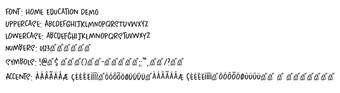
Home Education, from developer Home Education, is a decorative typeface that recreates neat, primary-school handwriting for documents and educational layouts. The font emphasizes legible, hand-drawn letterforms and consistent spacing to keep text readable in instructional materials. Its clear character shapes suit worksheets and children's book layouts while preserving a human tone. The font targets educators, homeschooling parents, and designers who need approachable typography for teaching materials.
What the font changes in educational documents
Home Education supplies a classroom-style handwriting voice for text. It includes a complete set of uppercase and lowercase Latin characters plus standard numerals and basic punctuation, which supports typical worksheet and workbook content. The typeface follows clean strokes and predictable letter proportions, helping printed and on-screen materials read like handwritten notes rather than formal serif or geometric sans faces.
How much typographic control it exposes to the user
Control is primarily handled by the host application rather than the font itself. As a single-format desktop face, the font is applied and scaled inside word processors or design software; advanced typographic features depend on the editor. Designers can set size, tracking and basic paragraph rules in their layout program, but the type file does not advertise extended feature sets beyond the standard Latin repertoire.
Is installation and daily use straightforward on Windows?
Installing and using the font is a standard desktop workflow. After unzipping a downloaded package, users install the .ttf file via the system menu; once installed the font appears in application font lists, including common word processors. That behavior makes the face quick to deploy in classroom handouts or lesson PDFs without additional tooling, and it behaves like other system-installed typefaces during routine editing.
Does it integrate with different outputs and language needs?
The font works across screen and print environments but has limited language breadth. It is compatible with desktop applications that accept TrueType fonts and produces consistent results when exported to PDF or printed. Support focuses on the standard Latin alphabet; extended accented characters or non-Latin scripts may be absent, so multilingual publishing requires verification before large-scale use.
A practical, focused choice for classroom-style typography
Home Education is a targeted option for educators and designers who want a readable, handwritten tone in teaching materials. Commercial licensing and language coverage are the main considerations to confirm before broad deployment. For projects that need a clear, humanized typeface in single-language educational documents, the font provides a direct and low-friction solution.
Pros
Handwritten aesthetic suited to primary-school materials
Complete uppercase and lowercase Latin character set
TrueType (.ttf) format for broad desktop application support
Cons
Limited support for extended characters and accents
Commercial use may require separate licensing arrangements
Typographic control depends on the host application's features
Laws concerning the use of this software vary from country to country. We do not encourage or condone the use of this program if it is in violation of these laws. Softonic may receive a referral fee if you click or buy any of the products featured here.